

A client sent me a screenshot last year. Their homepage bounce rate had climbed to 74 percent. Their first question was whether something was wrong with their SEO. I asked them to pull up the page on their phone and tell me what they saw above the fold. Long pause. Then: "The logo. A hero image. And a navigation menu." No headline. No context. No reason to stay. That was the answer.
Bounce rate gets blamed on traffic quality, algorithm changes, and content gaps. Sometimes those things are the problem. More often, it is the design -- specifically, what a visitor encounters in the first few seconds after they land.
What Bounce Rate Actually Measures in GA4
It is worth being precise here because the definition changed when Universal Analytics gave way to Google Analytics 4. In GA4, bounce rate is the percentage of sessions that were not engaged. An engaged session is one that lasts longer than 10 seconds, triggers a conversion event, or includes at least two pageviews. A session only counts as a bounce if it fails all three -- under 10 seconds, no key event, and only one pageview. Hit any one of those criteria and it registers as engaged.
That shift matters. Under the old system, a visitor who landed on a blog post, read every word, and left after eight minutes without clicking anywhere else was still counted as a bounce. GA4 corrected that. Time on page now factors in, which means a well-written single-page visit is no longer penalized the same way.
Bounce rate and engagement rate are two sides of the same number. If your engagement rate is 68 percent, your bounce rate is 32 percent. They always add up to 100. GA4 treats engagement rate as the primary metric and bounce rate as its complement -- a signal for where to investigate, not the headline number to optimize around.
One nuance worth knowing: GA4 lets you adjust the 10-second threshold inside Admin settings under Data Streams. If your site carries long-form content or video, 10 seconds may not reflect meaningful engagement. You can push the threshold to 20, 30, or 60 seconds to better match how real visitors actually use your pages.
How to Find Bounce Rate in GA4
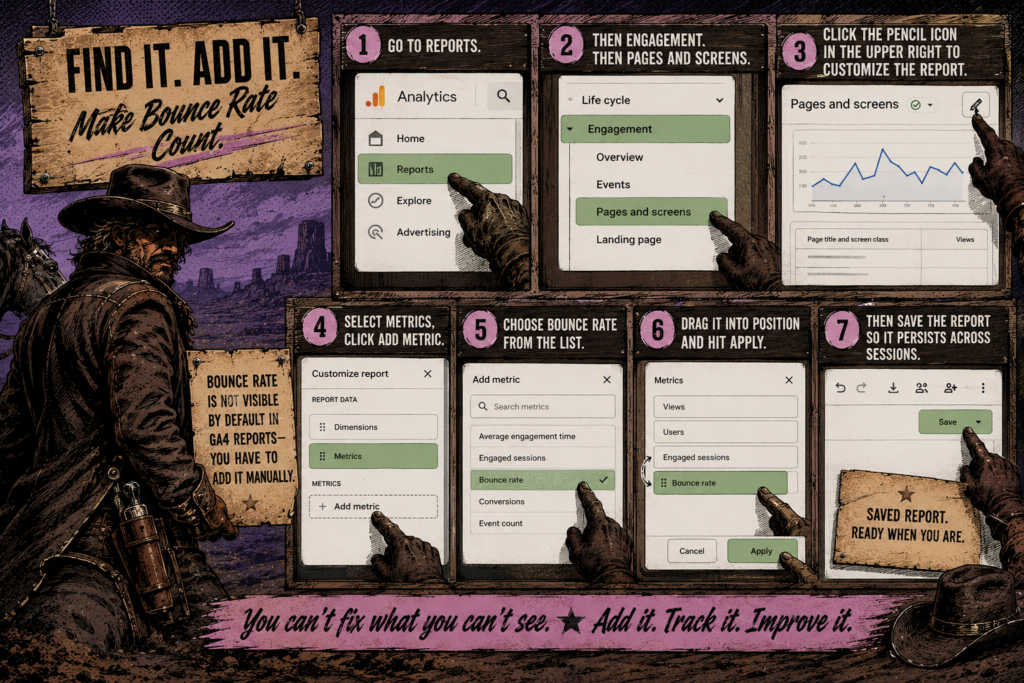
Bounce rate is not visible by default in GA4 reports -- you have to add it manually. Go to Reports, then Engagement, then Pages and Screens. Click the pencil icon in the upper right to customize the report. Select Metrics, click Add Metric, and choose Bounce Rate from the list. Drag it into position and hit Apply, then save the report so it persists across sessions.
You need Editor or Administrator permissions to customize reports. If you are locked out of that step, it is a permissions issue, not a GA4 bug.
Once it is visible, compare bounce rate across individual pages rather than anchoring to the site-wide number. A homepage at 70 percent tells a different story than a contact page at the same number. Context is everything.
When a High Bounce Rate Is Not a Problem
Some pages are built to do exactly one thing. A contact page, a phone number landing page, a glossary entry, a page designed to answer a single specific question -- these can bounce at 80 percent and still be working exactly as intended. The visitor arrived, got what they came for, and left. That is not a failure. That is the page doing its job.
The more useful question is not "is my bounce rate high?" It is "does the bounce rate on this specific page match what this page is supposed to accomplish?" A homepage bouncing at 70 percent is a problem worth investigating. A post-purchase confirmation page bouncing at 90 percent is expected behavior.
Industry benchmarks matter here too. Median bounce rates vary significantly by sector -- e-commerce sites typically land around 38 to 39 percent, while SaaS and information technology services often run closer to 48 percent. Comparing your numbers against the wrong benchmark leads to redesigning things that do not need to change.
The more useful diagnostic habit is tracking bounce rate directionally over time on specific pages, and comparing performance across traffic sources. A page that bounces differently for organic visitors versus paid traffic is telling you something precise about intent alignment rather than about design in isolation.
The Design Decisions That Cause Bounces
When a visitor lands on a page and leaves in under 10 seconds, design made the first call -- before content ever had a chance. Here is where that most commonly breaks down.
No Confirmation Above the Fold
A visitor needs to know within a few seconds that they landed in the right place. The page has to communicate its purpose immediately -- what it is, who it is for, and what the next step is. If the first thing someone sees is a decorative hero image with no explanatory headline, the design has already failed that test. There is no reason to stay.
This is not hypothetical. A nonprofit homepage I rebuilt in 2026 opened with a full-bleed landscape photo and a tagline so abstract it told you almost nothing about what the organization actually did. Bounce rate on that page was 81 percent. We added a direct headline, a two-sentence subhead, and a single CTA above the fold. Six weeks later it sat at 44 percent. Same traffic source. Same hero photo. Different design decision.
Readability Problems
Low contrast text, body copy set below 16px, line lengths that stretch too wide on desktop -- these are not minor aesthetic issues. They are friction. When reading requires effort, visitors stop reading. Poor typographic choices are one of the quieter drivers of high bounce rate, and they rarely get flagged in analytics because there is no event for "this was too hard to read."
Run your background and body text colors through a contrast checker. The Web Content Accessibility Guidelines set a minimum 4.5:1 contrast ratio for normal body text. If you are below that threshold, you have a legibility problem that is almost certainly contributing to early exits -- and creating barriers for users with low vision at the same time.
Slow Load Times
A page that takes more than two to three seconds to load is losing visitors before the design has a chance to make any impression. Core Web Vitals -- specifically Largest Contentful Paint -- measure how quickly the main content element appears on screen. Google's passing threshold is 2.5 seconds. Above that and a measurable share of your bounce rate is happening before anyone has seen anything you built.
Image weight is usually the first place to check. An uncompressed hero image, a plugin loading scripts it does not need on that page, a web font pulling from a slow external CDN -- any of these can push load time into the red. PageSpeed Insights gives you the full breakdown for free. Check mobile and desktop separately because the scores routinely diverge by a significant margin.
Intent Mismatch
This one sits at the intersection of design and copy, and the two are more connected than most people treat them. If someone clicks through from a search result or an ad expecting one thing and the page delivers something else -- different framing, different tone, a shifted primary focus -- they leave. The page may look polished. The problem is the gap between what the visitor expected and what they actually found when they arrived.
In 2026, with AI Overviews and generative search reshaping how people find and arrive at pages, intent alignment has become more critical than it has ever been. Visitors surfaced by an AI summary often arrive with a specific question already partially answered. If your page does not immediately confirm it goes deeper on that exact question, the session ends fast and they go back to find something that does.
No Path Forward
A page with no internal links and no clear next step is a dead end. Visitors who might have stayed and explored have nowhere to go except back. Thoughtful internal linking -- contextual links woven into the content, not a list of related posts bolted onto the bottom -- keeps visitors moving through the site. It also helps search systems understand how your pages relate to each other and distributes ranking authority across content that might otherwise sit unconnected.
Mobile Is Where Bounce Rates Break First
More than half of web traffic runs on mobile, and mobile is almost always where bounce rate problems are worst. A layout that reads cleanly on a 1440px desktop monitor can fall apart on a 390px phone screen. Buttons that are easy to tap at full size become a precision exercise on a small touchscreen. Font sizes that feel comfortable on a large display become eyestrain on a small one.
The fastest way to check this is Chrome DevTools. Right-click anywhere on the page, select Inspect, and click the mobile device icon in the top bar of the panel. Switch through a few common device sizes -- iPhone 14, Samsung Galaxy S23, iPad -- and look critically at what appears above the fold on each one. If the value proposition is not immediately visible and the CTA requires scrolling to find, that is the first thing to fix.
Pay attention to tap targets as well. Links and buttons that sit too close together on mobile cause mis-taps, which frustrate users and contribute to exits. The generally accepted minimum is a 48x48px tap target with adequate spacing between adjacent interactive elements. It is a small detail that has a disproportionate effect on mobile engagement.
The Metric That Deserves More Attention
GA4's framing -- engagement rate as the primary signal, bounce rate as its complement -- is worth adopting for how you think about your own pages. Instead of asking what percentage of visitors left, ask what percentage found enough reason to stay. The same underlying number, just reframed, leads to better design decisions because it points toward what to build rather than what to eliminate.
High engagement rate with low conversions points to a CTA or journey problem. Low engagement rate across the board points to something happening at the page level -- load speed, design clarity, intent mismatch, or some combination. Each pattern tells you something specific. Bounce rate as a standalone number rarely does.
What to Fix First
If your bounce rate is a concern, work through these in order before touching anything else.
Check load time on mobile with PageSpeed Insights. Look at the LCP score. If it is in the red -- above 2.5 seconds -- fix that first. Nothing else matters until the page actually loads within a reasonable window on the devices most of your visitors are using.
Pull the page up on your phone and look at what appears before any scrolling. Ask whether someone who had never heard of you would understand within five seconds what the page is about and what to do next. If the answer is no, the layout needs work before the copy does.
Run a contrast check on your body text against its background. Below 4.5:1 means a legibility problem. Fixing it improves bounce rate, accessibility compliance, and user trust -- three things addressed by one change.
Look at internal links on your highest-bounce pages. A page with no contextual links to related content leaves visitors with nowhere to go. Add two or three links per post minimum, placed where they naturally serve the reader rather than appended as a list at the bottom.
Finally, segment bounce rate by traffic source in GA4. If organic visitors bounce at 40 percent while paid traffic bounces at 75 percent, the page is probably fine -- the ad targeting or landing page match is the issue. Separating those numbers keeps you from redesigning something that is working for most of your audience.
One Last Thing
A visitor who bounces is not a lost cause. They are a signal. They rode in, looked around, and left before the dust settled -- not because they were the wrong visitor, but because the page gave them no reason to stay. Fix what they see in the first few seconds and the story changes. The wanted poster on your page should read: engaged visitor, last seen clicking deeper. That is the one worth building for.
TeazMedia designs and builds websites for mission-driven organizations that need more than a template. If your site is losing visitors before they have a chance to connect with your work, let's talk.